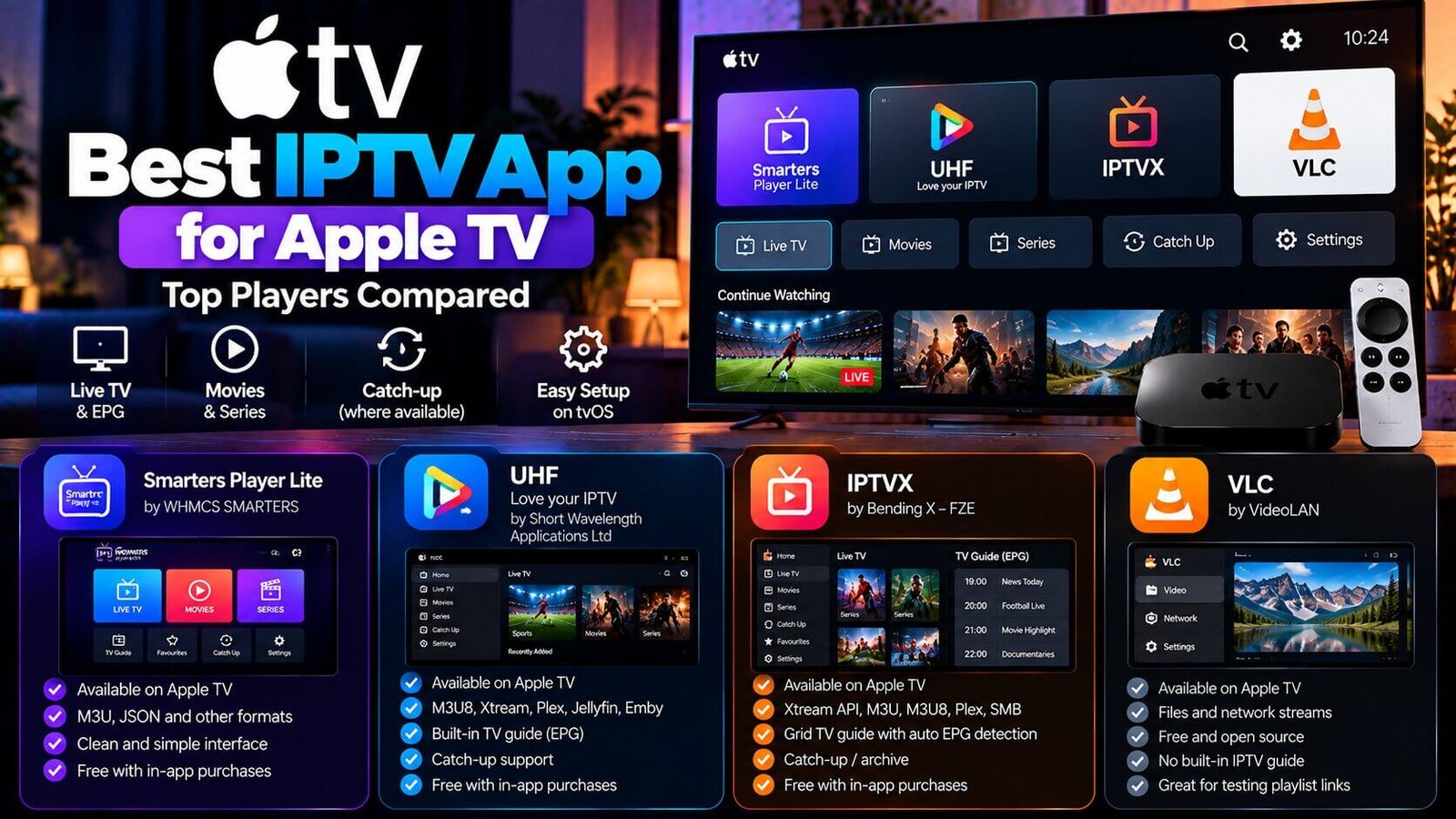
Best IPTV App for Apple TV
The best IPTV app for Apple TV is one that genuinely runs on tvOS, accepts the login format your provider supplies and has a TV guide you’re comfortable using with the Siri Remote. The App Store has plenty of IPTV players, but not all of them are available on Apple TV, and many have similar names. This guide compares four apps whose Apple TV availability and features we checked on their App Store listings, and explains how to choose between them.
Choosing the best IPTV app for Apple TV: what to check
- Apple TV availability. An app listed for iPhone and iPad isn’t necessarily available on Apple TV. On the App Store listing, check that Apple TV appears among the supported devices.
- Login formats. Providers typically supply an Xtream-style login or an M3U playlist link. Make sure the app accepts yours.
- TV guide. If you mostly watch live channels, a clear EPG matters more than extra features.
- Remote use. On Apple TV everything happens with the Siri Remote, so a layout designed for the TV is easier than one designed for touch.
- Price model. The apps below are free to download; some offer in-app purchases for extra features. Check what each listing says those purchases cover.
- The publisher. Look-alike apps are common. Check the developer name on the listing.
For a comparison across all devices, not just Apple TV, see our guide to the best IPTV players for every device.
Apple TV IPTV apps compared
| Smarters Player Lite | UHF – Love your IPTV | IPTVX | VLC | |
|---|---|---|---|---|
| Publisher | WHMCS SMARTERS | Short Wavelength Applications Ltd | Bending X – FZE | VideoLAN |
| Formats listed | M3U, JSON, “other standard formats” | M3U8, Xtream, Plex, Jellyfin, Emby | Xtream API, M3U, M3U8, Plex, SMB | Files and network streams |
| TV guide (EPG) | Not described in the listing | Yes | Yes, grid; automatic EPG detection and custom EPG URL | Not described in the listing |
| Catch-up | Not described in the listing | Yes | Yes (archive/catch-up) | Not described in the listing |
| Price listed | Free, in-app purchases | Free, in-app purchases; core features free | Free, in-app purchases | Free and open source |
All details come from each app’s UK App Store listing, checked on 30 September 2026. Listings change, so check the current version before installing or paying.
Smarters Player Lite
Smarters Player Lite is the Apple edition of IPTV Smarters, listed by the developer for iPhone, iPad and Apple TV. Its App Store description lists M3U and JSON playlists and “other standard formats”, from local or remote sources.
- May suit you if you already use IPTV Smarters on other devices and want a familiar name on Apple TV.
- Check first: the listing doesn’t describe an Xtream-style login or a TV guide, so confirm the app handles your provider’s format.
For finding the genuine app and adding a playlist, see our IPTV Smarters Lite guide.
UHF – Love your IPTV
UHF’s listing describes it as a player that turns “M3U8, Xtream, Plex, Jellyfin, or Emby playlists” into an Apple TV experience. It lists search across playlists, an EPG, catch-up support and picture-in-picture, and says its “core playback and content tools” are free, with in-app purchases for extras.
- May suit you if your provider gives you an Xtream login and you want a guide and catch-up on Apple TV.
- Also useful if you use a Plex, Jellyfin or Emby media server alongside IPTV.
IPTVX
IPTVX’s listing names support for “Xtream API, M3U, M3U8, PLEX and SMB”. It lists a TV guide tab with an EPG grid, automatic EPG detection “if your server contains an EPG file”, the option to add your own EPG URL, catch-up, multiple playlists, parental control and iCloud sync across your Apple devices. It also lists support for Dolby Vision, HDR10 and HLG.
- May suit you if you want a detailed guide, channel management and a single library synced across Apple TV, iPhone and iPad.
- Also relevant for 4K HDR viewing, given its listed HDR support; see our guide to 4K streaming requirements.
VLC
VideoLAN’s VLC lists Apple TV among its supported devices, alongside iPhone and iPad. Its listing describes it as “free and open source” and able to stream from network sources and the web.
- May suit you if you want to test whether a stream or playlist works, or you only watch occasionally.
- Limits: it’s a general media player; its listing doesn’t describe an Xtream login or an IPTV-style TV guide.
Which Apple TV IPTV app may suit you?
| If you… | One option to consider |
|---|---|
| Have an Xtream-style login and watch mostly live TV | UHF or IPTVX, both of which list Xtream support and an EPG |
| Want HDR support listed for 4K viewing | IPTVX, which lists Dolby Vision, HDR10 and HLG |
| Use IPTV Smarters elsewhere and have an M3U link | Smarters Player Lite |
| Just want to check a playlist works | VLC |
Since all four are free to download, one practical approach is to try two with your own login and keep the one you find easiest with the remote.
Setting up an IPTV app on Apple TV
The steps are much the same whichever app you choose. For other devices in your home, see our IPTV installation guides.
- Open the App Store on the Apple TV itself and search for the app by name.
- Check the publisher matches the table above, then download it.
- Open the app and add your login or playlist in the format your provider supplied.
- Add or check the TV guide. If it stays empty with an M3U playlist, see how to add an EPG to IPTV.
- If the app stops responding, force quit it from the app switcher and reopen it, as Apple’s support guide describes.
For the best picture, use a wired connection where your Apple TV model has an Ethernet port. Our guide to internet speed for IPTV covers the numbers. If you watch on iPhone or iPad as well, see setting up IPTV on iPhone and iPad.
Frequently asked questions
Do any Apple TV IPTV apps support HDR?
Of the apps compared here, IPTVX lists Dolby Vision, HDR10 and HLG support in its App Store description. HDR also depends on your Apple TV model, TV and the stream itself.
How do I know an IPTV app works on Apple TV?
Check the App Store listing’s supported devices for Apple TV, and search the App Store on the Apple TV itself. Apps built only for iPhone and iPad generally won’t be offered there.
Are Apple TV IPTV apps free?
The four compared here are free to download; check each App Store listing for any in-app purchases and what they unlock. Your IPTV service is always a separate subscription.
Which Apple TV IPTV apps support Xtream Codes?
Of the apps compared here, UHF and IPTVX both list Xtream support in their App Store descriptions. Smarters Player Lite’s listing mentions M3U and JSON.
Can I use the same IPTV login on Apple TV and my iPhone?
Usually, yes, if the apps on both devices accept your format. Watching on both at once is a matter for your provider’s terms and your plan.
Try your Apple TV app with real channels
The quickest way to choose is to test with your own login. Request a free 24-hour trial and try it in one or two of these apps on your Apple TV.