๐Ÿ“ฐ Our Blog

IPTV guides and articles

Practical guides to setting up IPTV, choosing apps and fixing common problems โ€” written for UK viewers.

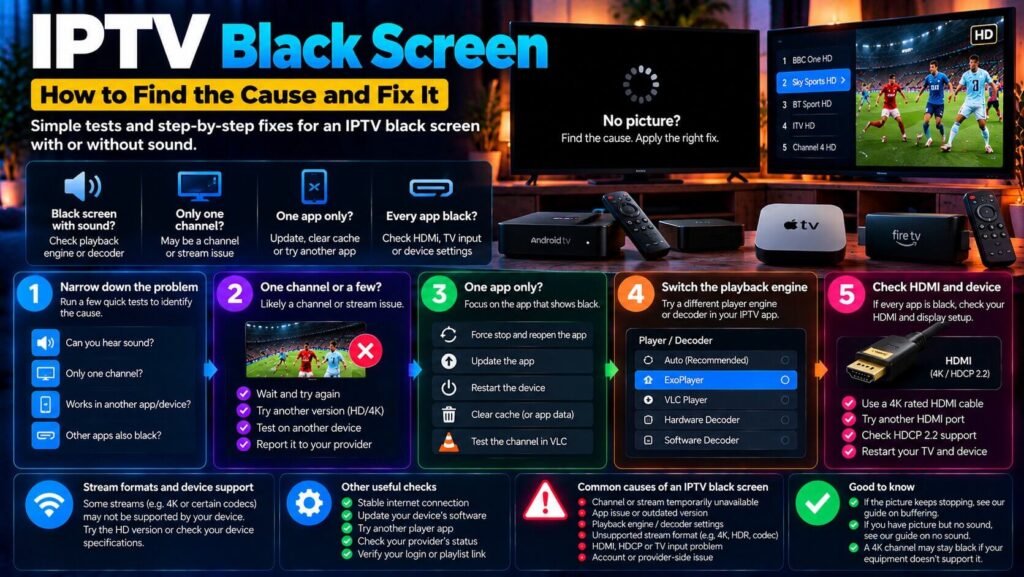
IPTV black screen troubleshooting guide showing channel checks, app fixes, playback engine changes, decoder settings and HDMI troubleshooting IPTV Troubleshooting
โ—ท 7 min read

IPTV Black Screen: How to Fix It

IPTV Black Screen: How to Fix It An IPTV black screen can come from several places: the channel itself, the player app, the way the app decodes video, or the connection between your device and the TV. The quickest route to a fix is to narrow it down first. This guide gives you a short […]

Read more
XCIPTV Player Android setup guide showing Google Play installation, Xtream Codes or M3U login, EPG, catch-up, recording and playback options IPTV Setup & Devices
โ—ท 6 min read

XCIPTV Player: How to Set It Up on Android

XCIPTV Player: How to Set It Up on Android XCIPTV Player is a free-to-install Android IPTV player from the developer OTTRUN. As its Google Play listing states, it doesn’t come with any channels: you add the login details or playlist your IPTV provider gives you. This guide covers getting the official XCIPTV app, the source […]

Read more
Cast IPTV to TV guide showing Google Cast, Chromecast, Google TV Streamer and AirPlay with supported apps, same Wi-Fi setup and troubleshooting IPTV Setup & Devices
โ—ท 6 min read

How to Cast IPTV to Your TV

How to Cast IPTV to Your TV If you already watch IPTV on a phone or tablet, casting lets you send what’s playing to a bigger screen. You can cast IPTV using Google Cast (for Chromecast, Google TV Streamer and TVs with Google Cast) or AirPlay (for Apple TV 4K and AirPlay 2-enabled TVs), but […]

Read more
HotPlayer activation guide showing MAC address setup, M3U or Xtream playlist upload, Lock MAC protection and official app sources IPTV Apps & Players
โ—ท 6 min read

HotPlayer: How to Activate It and Add a Playlist

HotPlayer: How to Activate It and Add a Playlist HotPlayer is a media player published by STE DIGI VIBES. You activate it against your device’s MAC address and upload your playlist through the developer’s website. This guide explains where the app is officially listed, how activation and playlist upload work, how the Lock MAC option […]

Read more
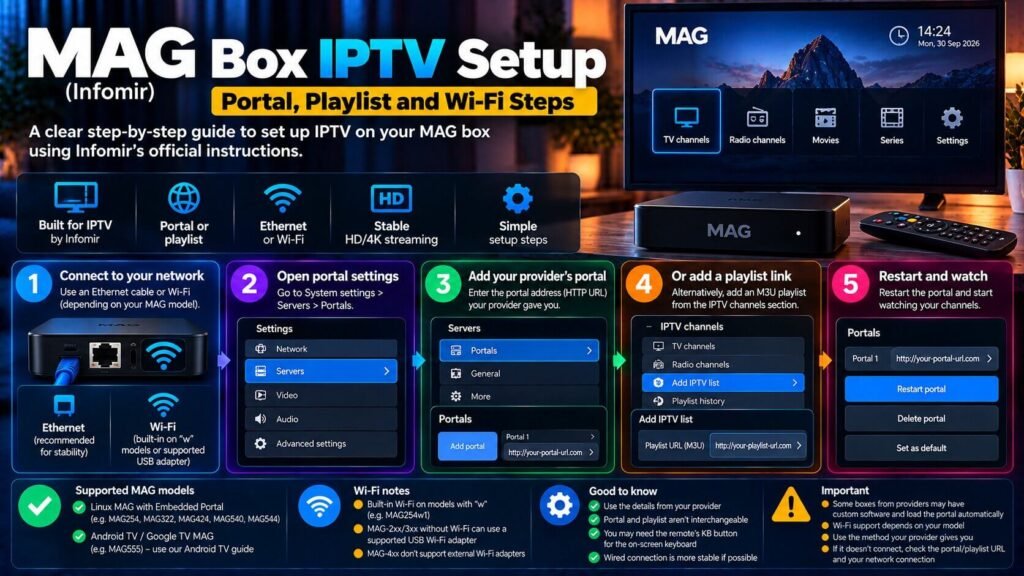
MAG box IPTV setup guide showing Ethernet or Wi-Fi connection, portal URL configuration, M3U playlist setup and portal restart steps IPTV Setup & Devices
โ—ท 7 min read

How to Set Up IPTV on a MAG Box

How to Set Up IPTV on a MAG Box MAG set-top boxes, made by Infomir, are built for IPTV and connect to a provider’s service through a portal or a playlist. MAG box IPTV setup usually takes three steps: connect the box to your network, enter the portal address or playlist link your provider supplies, […]

Read more
IPTV on iPhone and iPad setup guide showing App Store players, Xtream or M3U login, EPG, AirPlay to Apple TV and mobile data use IPTV Setup & Devices
โ—ท 7 min read

How to Set Up IPTV on iPhone and iPad

How to Set Up IPTV on iPhone and iPad This IPTV iPhone iPad guide covers everything from choosing a player to watching on the big screen. The process is straightforward: install an IPTV player from the App Store, add the login or playlist from your provider, and you’re watching. The details that matter on Apple’s […]

Read more
IPTV APK installation safety guide showing trusted download sources, Android unknown app permissions, Google Play Protect and Fire TV sideloading settings IPTV Setup & Devices
โ—ท 8 min read

IPTV APK Files: How to Install Apps Safely

IPTV APK Files: How to Install Apps Safely An IPTV APK is simply the installation file for an Android player app. Some IPTV players are offered as a direct download from the developer rather than through an app store. That’s a normal way to distribute apps, but where the file comes from and how your […]

Read more
IPTV delay explained with live stream latency, encoding, segment delivery, player buffering and comparison with broadcast TV IPTV Guides
โ—ท 8 min read

IPTV Delay: Why Live Streams Can Be Behind Broadcast TV

IPTV Delay: Why Live Streams Can Be Behind Broadcast TV IPTV delay is the gap between a live moment happening and it appearing on your screen. You may notice it when the same live programme is showing on an aerial TV in another room, or when two devices at home show the same channel at […]

Read more

Ready to choose your plan?

Choose the plan length that suits you, or start with a free 24-hour trial.

IPTV UK HQ

Your selection is ready.

WhatsApp contact is not yet available. No message has been sent and no order has been created.

Chat on WhatsApp
United Kingdom (+44) is selected. Choose another country or type an international number beginning with +.