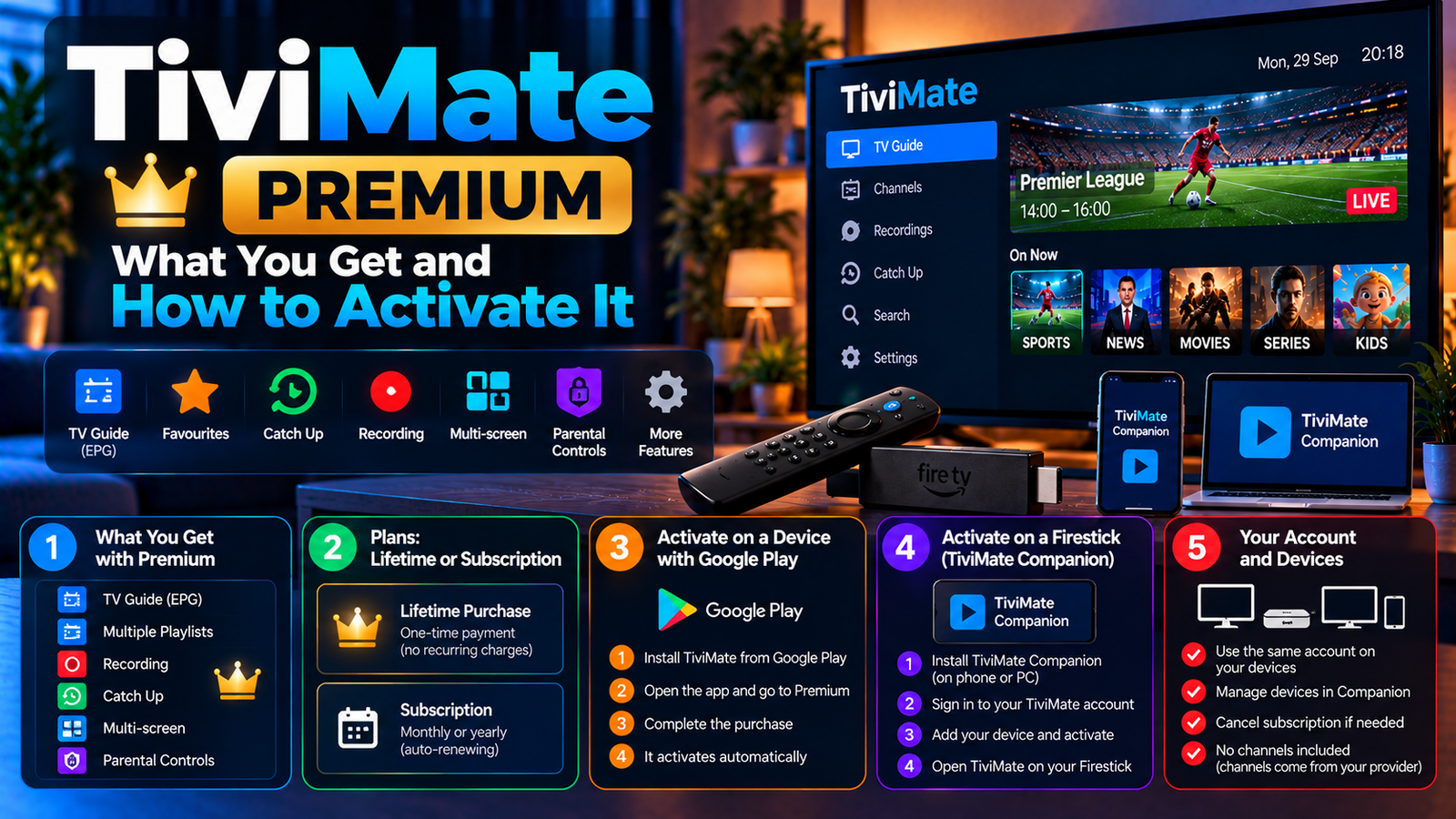
TiviMate Premium: What You Get and How to Activate It
TiviMate Premium is the paid upgrade for the TiviMate IPTV player app. It unlocks extra app features, but it doesn’t include any channels; those still come from your IPTV provider. This guide explains how the developer sells Premium, how to activate it on a device with Google Play and on one without (such as a Fire TV Stick) using the TiviMate Companion app, and how to manage devices, renewals and refunds.
What TiviMate Premium is (and isn’t)
People search for it as TiviMate Premium, “TiviMate Pro” or “TV Mate Pro”, but it’s the same thing: a paid upgrade to the app from its developer, Armobsoft FZE.
The developer’s terms of use are clear about its scope: any purchase or subscription “unlocks application features only” and gives no access to channels or streams. In other words:
| TiviMate Premium | An IPTV service | |
|---|---|---|
| What it is | An upgrade to the player app | The channels, films and guide data you watch |
| Who provides it | The app’s developer | Your IPTV provider |
| Needed to watch anything? | No: the free app plays your playlist | Yes |
If you haven’t set up the app yet, start with our TiviMate IPTV Player guide, or browse our device setup guides.
What you get with Premium
The developer lists TiviMate’s features on its website and Google Play listing: a grid TV guide, multiple playlists, favourite channels, catch-up, recording, search, parental controls and multiview. It doesn’t publish a feature-by-feature split between the free app and Premium on those public pages.
That matters when you’re deciding, so the reliable approach is:
- Install the free app and add your playlist, either an Xtream Codes login or an M3U link.
- Use it for a while and notice which options ask you to upgrade.
- Open the upgrade screen in the app, which shows what Premium adds and the current plans before you pay.
Be wary of third-party lists claiming exactly which features are “Premium only”. They’re often out of date, because the developer can change what the upgrade includes between versions.
Lifetime purchase or subscription
According to TiviMate’s terms of use, the developer “offers a one-time lifetime purchase and one or more auto-renewing subscriptions”:
| Option | How it’s billed | Good to know |
|---|---|---|
| Lifetime purchase | “A single payment with no recurring charges” | No renewals to manage |
| Auto-renewing subscription | Renews for the same period as its billing period, “for example, monthly or yearly”, at the then-current price | Renews automatically unless you cancel before the renewal date |
The terms say the available plans, billing periods and prices “are shown at the point of purchase”, so check the upgrade screen in the app for the current options before you decide.
Activating on a device with Google Play
On an Android TV or Google TV device where you installed TiviMate from Google Play, Premium is bought as an in-app purchase:
- Open TiviMate and go to its settings.
- Choose the Premium or upgrade option.
- Pick a plan and confirm the purchase through Google Play.
Menu names can change between app versions, so if you can’t see the option straight away, look for anything labelled Premium or upgrade in the settings. Purchases made this way are managed and refunded through Google Play, not the developer.
Activating on a Firestick: TiviMate Companion
Fire TV devices don’t have Google Play, so the in-app route above isn’t available there. The developer provides a separate app for this: TiviMate Companion, also from Armobsoft FZE. Its Google Play listing describes it plainly:
“This app is intended to unlock Premium functionality of TiviMate IPTV player on devices without Google Play. It allows managing your activated devices also. It is not IPTV player app!”
In practice, that means:
- You install TiviMate Companion from Google Play on a separate Android device that has Google Play, typically a phone or tablet.
- You use it to buy Premium and activate your TiviMate installation on the device without Google Play, following the prompts in the Companion app.
- You can come back to it later to see and manage your activated devices.
Companion doesn’t play anything itself. TiviMate still needs to be installed on the Firestick first; our guide to installing TiviMate on a Firestick covers that, including the official Downloader code.
Your TiviMate account and devices
The TiviMate website has an account area with sign-up and log-in pages and a dashboard divided into Devices, Subscription and Account sections. That’s where you can review the devices using your Premium and the status of your subscription.
A few points from the developer’s terms of use:
- Your licence is “personal, non-transferable” and covers use “on devices you own or control”.
- The developer doesn’t state a fixed number of devices per Premium purchase on its public pages, so check at the point of purchase if you plan to use several TVs.
- If you replace a device, use the Devices section of your account or the Companion app to manage which devices are activated.
Cancelling, renewals and refunds
| Where you bought Premium | How to cancel | Refunds |
|---|---|---|
| Through an app store (for example Google Play) | In your account settings with that store | Handled under that store’s refund policy |
| Directly on the TiviMate website | As described at the point of purchase, or by contacting support | The terms say sales are final, with refunds at the developer’s discretion, without limiting statutory consumer rights |
Cancelling “stops future renewals but does not shorten the period you have already paid for”. If a renewal price changes, the terms say you’ll be notified in advance.
Is TiviMate Premium worth it?
There’s no universal answer; it depends on how you use the app. Premium may suit you if:
- TiviMate is your main way of watching TV, most days of the week.
- You’ve found features in the free app that ask you to upgrade, and you’d genuinely use them.
- You’d rather pay once with the lifetime option than manage a recurring subscription.
It may be less useful if you only watch occasionally, or if you haven’t yet settled on TiviMate. If you’re still weighing up players, our comparison of TiviMate and IPTV Smarters and our guide to the best IPTV players for each device are good places to start.
Whatever you decide, test the free app with a working playlist first. Paying for Premium won’t fix a playlist or connection problem.
Frequently asked questions
Does TiviMate Premium include any channels?
No. The developer states that purchases unlock app features only and don’t include channels, streams or content. You need your own IPTV service.
Is TiviMate Premium a one-off payment?
It can be. The developer offers a one-time lifetime purchase as well as auto-renewing subscriptions. The current options are shown at the point of purchase.
What is TiviMate Companion?
A separate app from the same developer, used on a Google Play device to unlock Premium for TiviMate on devices without Google Play, such as a Firestick, and to manage activated devices.
How do I cancel a TiviMate subscription?
If you bought it through an app store, cancel in that store’s account settings. For website purchases, follow the method shown at purchase or contact the developer’s support.
Can I use TiviMate Premium on a Fire TV Stick?
Yes, on Fire OS sticks where TiviMate is installed. Because Fire TV has no Google Play, activation is done with the TiviMate Companion app.
Try TiviMate with a real playlist before upgrading
The free TiviMate app is enough to see whether it suits you. Add a playlist from a free 24-hour IPTV UK HQ trial, try it on your own TV, then decide whether Premium is worth it.