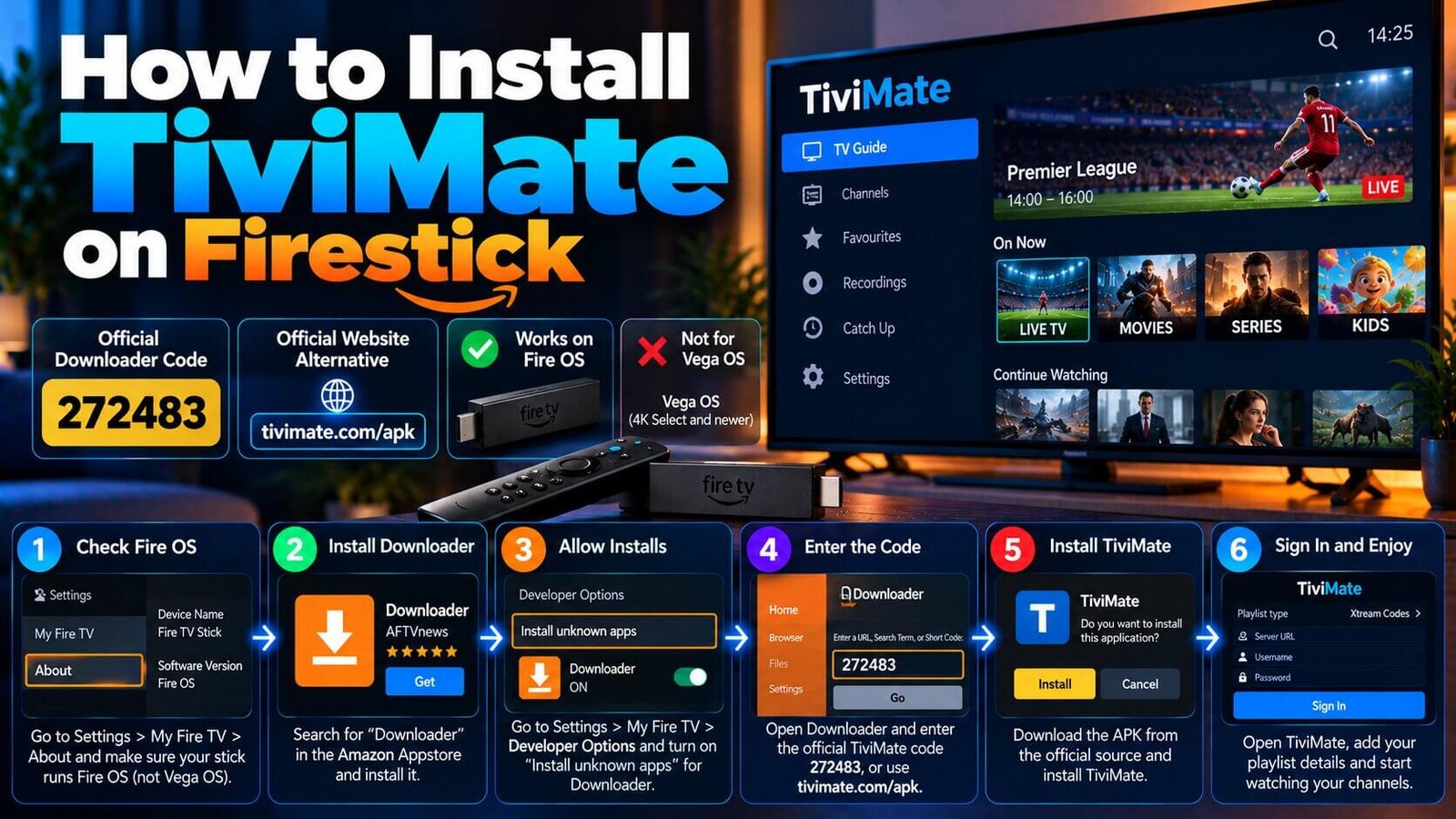
How to Install TiviMate on Firestick
The official TiviMate Downloader code is 272483. It’s published on the developer’s own website, tivimate.com, alongside the web address tivimate.com/apk, and both lead to the same official app file. With it, installing TiviMate on a Fire OS Firestick takes a few minutes. This guide explains where the code comes from, walks through the install, and covers first-run setup, updates and what to do if your stick runs Vega OS.
Before you start
Three things need to be in place:
- A stick that runs Fire OS. TiviMate is an Android app, and Fire OS is Amazon’s Android-based system. Amazon says the Fire TV Stick 4K Select and all later Fire TV Sticks run Vega OS instead, which only installs apps from the Amazon Appstore. You can check under Settings > My Fire TV > About.
- The Downloader app from AFTVnews, installed from the Amazon Appstore.
- Permission for Downloader to install apps, set in the stick’s Developer Options.
If you haven’t done steps 2 and 3 before, our guide to setting up IPTV on a Firestick walks through the OS check, Downloader and the Developer Options setting in detail. The rest of this guide assumes they’re done.
You’ll also need your playlist details from your IPTV provider for the first-run step.
Finally, check you have some free storage. Amazon’s specifications list 8 GB of storage on most Fire TV Sticks, shared by the system and every app you install. TiviMate itself is small, but recordings and other apps add up, so remove anything you no longer use before you start.
The official TiviMate Downloader code
Downloader lets you type either a full web address or a short numeric code created with the AFTVnews URL shortener. Anyone can create a code, which is why it matters where yours comes from.
| What to enter in Downloader | Where it’s published | Where it leads |
|---|---|---|
| 272483 | TiviMate’s official website | The official TiviMate APK on the developer’s file server |
| tivimate.com/apk | TiviMate’s official website | The same official APK file |
We checked both on 29 September 2026: the code’s AFTVnews record and the web address each point to files.tivimate.com/tivimate.apk, a file of about 21 MB. Codes and file locations can change, so if either doesn’t work, check the download section of tivimate.com for the current details rather than trying a code from a video or forum.
Quick reference
| Item | Detail (checked 29 September 2026) |
|---|---|
| Downloader code | 272483 |
| Web address alternative | tivimate.com/apk |
| File it downloads | The official TiviMate APK, about 21 MB |
| Works on | Fire TV devices running Fire OS |
| Doesn’t work on | Vega OS models, such as the Fire TV Stick 4K Select |
Other “TiviMate download codes” you may find online are made by third parties. They might point to an old version, a modified copy or something else entirely, and there’s no easy way to tell from the TV screen.
Installing TiviMate step by step
- Open Downloader and go to its Home screen, where there’s a box for a web address or code.
- Enter the TiviMate Downloader code 272483, or type tivimate.com/apk, then select Go.
- Wait for the download. At about 21 MB it usually only takes a moment on a reasonable connection.
- Select Install when the installer appears. If you see a message that installs are blocked, go back and check Downloader is allowed to install unknown apps.
- Choose Done when the installation finishes, rather than opening the app straight away.
- Remove the APK file. In Downloader, open the list of downloaded files and delete the TiviMate file. The installed app isn’t affected, and you get the storage back.
TiviMate then appears in your list of apps. To reach it faster, open your apps, highlight TiviMate and use the remote’s options button to move it towards the front.
First run: adding your playlist
The first time TiviMate opens, it asks for a playlist. According to its Google Play listing, it accepts M3U, Xtream Codes and Stalker Portal sources.
- With an Xtream Codes login, choose the Xtream option and enter the server address, username and password from your provider.
- With an M3U link, choose the playlist URL option and enter the full address.
The first channel and guide download can take a few minutes. After that, TiviMate opens straight into your channels.
For the full walkthrough, including the TV guide, favourites, catch-up and recording, see our main TiviMate IPTV Player guide. It covers everything inside the app, so this page can stick to the Firestick install.
Keeping TiviMate updated
TiviMate’s website says the direct APK version “checks for updates”, so the app itself tells you when a new version is available. If you ever need to reinstall or update by hand, repeat the install using code 272483 or tivimate.com/apk. A new version installs over the old one.
Keep Fire OS up to date as well, under Settings > My Fire TV > About.
If the install doesn’t work
| What you see | Likely reason | What to do |
|---|---|---|
| Downloader can’t be found in the Appstore | Your stick runs Vega OS | Sideloading isn’t available on Vega OS; see below |
| “Install blocked” or no Install option | Downloader isn’t allowed to install apps | Allow it in Developer Options, as described in our Firestick setup guide |
| The code shows an error page | Typing mistake, or the code has changed | Re-enter 272483 carefully, or use tivimate.com/apk |
| Download stops partway | Connection drop or low storage | Free up space and try again closer to the router |
| TiviMate installs but channels buffer | Network or device performance | See our guide to Firestick buffering |
If your stick runs Vega OS
The official TiviMate download is an Android app file, and Vega OS sticks can’t install apps from outside the Amazon Appstore. The developer’s website lists Google Play and the direct APK as its download routes; it doesn’t list an Amazon Appstore version. On a Vega OS stick, look for a player the Appstore offers for your model, or use a different device for TiviMate. Our guide to the best IPTV apps for Firestick compares the options.
Frequently asked questions
Is 272483 the official TiviMate Downloader code?
Yes. At the time of writing, 272483 is the code shown on TiviMate’s official website, and it leads to the official APK file. Check tivimate.com if it ever stops working.
Can I get TiviMate from the Amazon Appstore?
The developer’s website lists Google Play and a direct APK download, not an Amazon Appstore version. Apps with similar names in the Appstore aren’t the official TiviMate.
Will TiviMate run on a Fire TV Stick 4K Select?
Not via the official download. The 4K Select runs Vega OS, which doesn’t allow Android apps to be installed from outside the Amazon Appstore.
How does TiviMate update on a Firestick?
The direct APK version checks for updates itself. You can also reinstall the latest version with the same code or web address.
Is TiviMate Premium required on a Firestick?
No. You can install TiviMate and add a playlist without it. Premium unlocks extra app features and doesn’t include any channels.
Add a playlist to your new player
TiviMate needs a playlist before it shows anything. Ask IPTV UK HQ for a free 24-hour trial and use those login details as the first source in your new player.